
Where to cut? Automatic document cropping strategies
March 14, 2026
When you start a scan in FairScan and point your device to a document, the app detects the document and displays a quadrilateral on top of the image to show how it will crop it when you press the capture button. Two separate steps happen one after the other:
- A machine-learning segmentation model detects which pixels of the image are part of the document.
- An algorithm derives a quadrilateral from the outline (or contour) of the document pixels returned by step 1.
We don't want just any polygon, we want one with four edges, because that's what can be mapped to a digital image or to a PDF page. And that's the responsibility of step 2, which could be summarized as: "where to cut?"

There are multiple ways to do that, and they don't all lead to the same result. The difference is subtle in many cases, but in others, that are not so rare, it's impossible to miss.
Approach 1: looking for corners
I found many examples on the web that show how to code your own "document scanner" in just a few lines of code. All of them rely on the Douglas-Peucker algorithm, that was published in 1973 in the context of cartographic generalization. This algorithm simplifies a curve by removing points while ensuring that the simplified curve stays within a given distance of the original one. When applying it to the contour of the document pixels, we can check whether the resulting polygon has 4 edges: in that case, we're done.
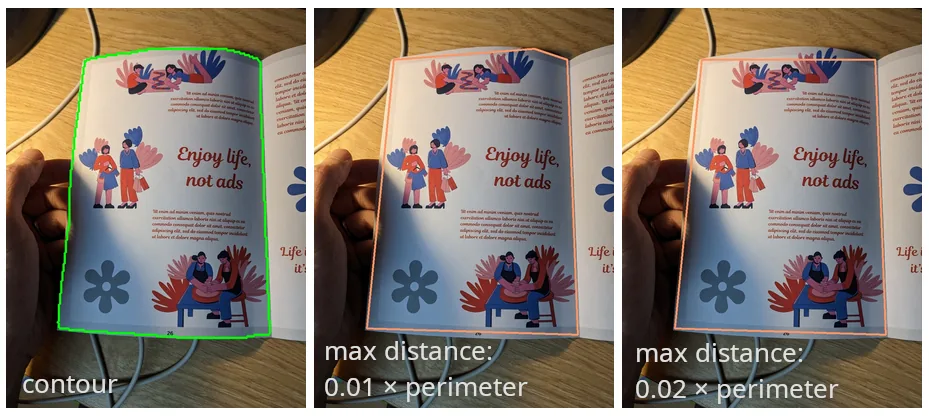
Douglas-Peucker is a simple algorithm, it's well defined and already implemented: why look further? The problem is that it gives bad results in some cases:
- Some documents have rounded corners (for example some identity cards). The algorithm then selects a point on the contour that is close to the corner but it has to "cut" a bit the edges of the document.
- When a document misses a corner (folded, stapled...), it appears as having 5 edges, not 4. To have only 4 vertices, the algorithm has, again, to cut some part of the document.
- When the document detection step returns a set of pixels that doesn't reflect well the reality, the algorithm may give very bad results. Among the hundreds of points in the contour, only 4 matter for the final result and any imprecision has a big impact on the resulting quadrilateral.
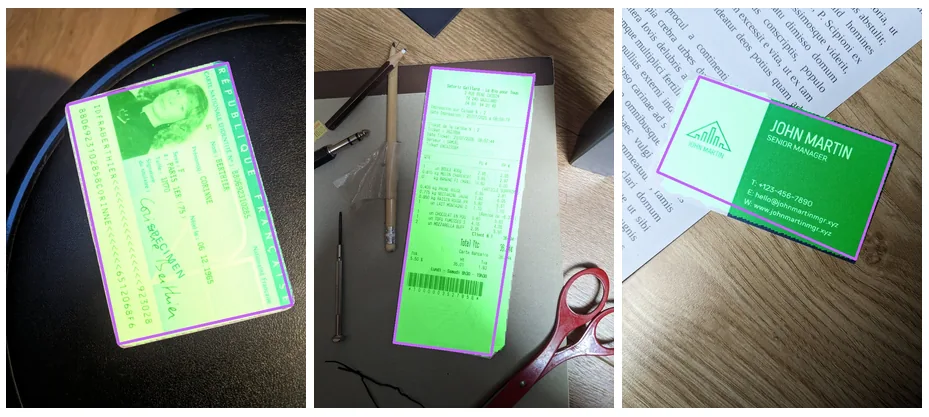
The algorithm works by removing points from the initial contour. By design, the four corners of the resulting quadrilateral must already exist in the original contour. The algorithm cannot create new corners, and this turns out to be a major limitation.
Approach 2: looking for edges
I looked for a different kind of algorithm, that is more adapted to identifying a document. A key intuition is that edges are long and stable parts of the contour, while corners are short and often noisy. Instead of focusing on the small corner regions, we can rely on the long straight segments that make up most of the document boundary. There are well-known mathematical ways to fit a line based on a set of points, so the main challenge is to split the points of the contour so that we can define a line for each edge.
One way to split the contour points is to look at the "orientation" of the contour at each point: we can take the previous point and the next point and draw a line between them to get a sense of the direction (the tangent) of the contour at this precise position. Points that are part of the same edge of the document should have the same orientation. Of course, there may be some imperfections in the contour so we can use a sliding window to remove slight variations.
The algorithm can then look like that:
- calculate the orientation (an angle) of the contour for each one of its points
- group adjacent points that have a similar orientation
- select the 4 largest groups of points
- fit a line for each group: each one is an edge of the quadrilateral
- corners can be calculated as the intersections of adjacent edges
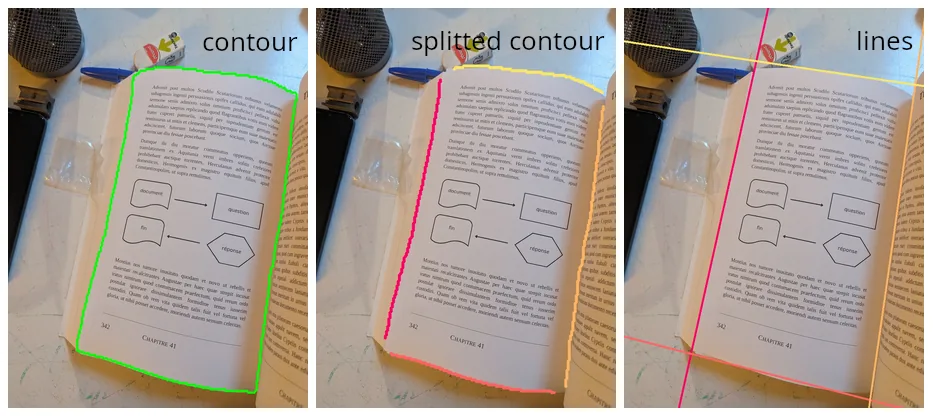
In this algorithm, we use much more data than when focusing on the corners: a few "bad" points are therefore less likely to impact the result.
This algorithm fixes the problems Douglas-Peucker had with missing or rounded corners: we can reconstruct corners that are not part of the original contour. It also handles cases better when the detected document pixels (the segmentation mask) are imperfect, because it can rely on partial edges to reconstruct them. That doesn't mean it can save the worst cases, but that's still quite valuable.
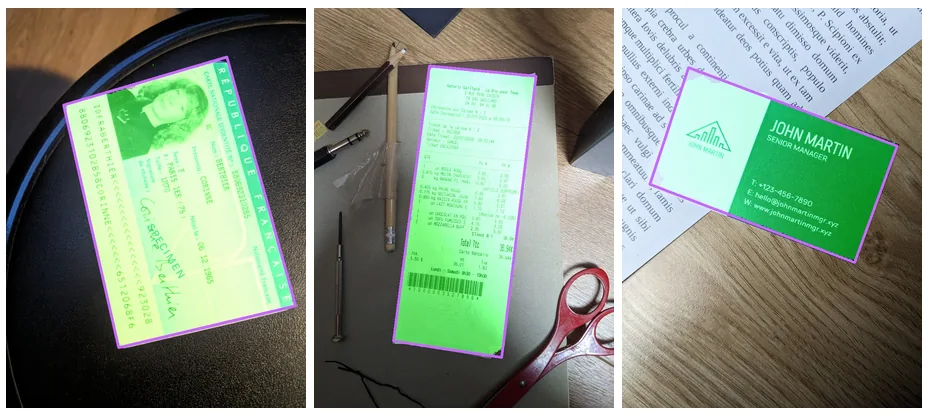
This new algorithm is slightly slower than Douglas-Peucker, but still very fast compared to the segmentation model itself, so the difference is not noticeable in the app.
More importantly, it produces much more reliable quadrilaterals in difficult cases such as rounded corners, folded documents, or imperfect segmentation masks. After testing it on hundreds of images, it consistently produced better results than the previous approach.
The key idea is simple: instead of trying to guess four precise corner points, the algorithm looks for the four long edges that define the document. Those edges are much more stable and carry far more information than the small, often noisy corner regions. In practice, that small change in perspective makes automatic cropping much more robust.
The new edge-based detection algorithm is now available in FairScan 1.16.0.